20 Minute Mail Free: Get a Fast Temporary Email Address for Private Online Signups
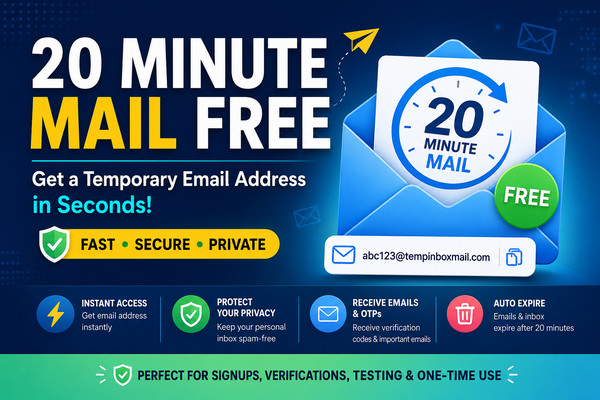
Get a fast temporary inbox with 20 Minute Mail Free – Get a Temporary Email in Seconds, perfect for testing, signups, and verification

Do you really need to give your personal email address every time a website asks you to sign up? Probably not.
From newsletters and promotional messages to verification emails and unwanted marketing, using your primary inbox for every online registration can quickly become frustrating. That is where 20 minute mail free services can be useful.
A temporary email gives you a short-term inbox that can be used for situations where you need to receive an email but don’t want to expose your regular email address. A 20-minute mailbox is particularly convenient when you only need an email address for a quick verification, website test, download, trial registration, or one-time online activity.
With TempInboxMail, users can access a temporary inbox through the website and use a disposable email address for short-term email-receiving needs.
Try TempInboxMail: tempinboxmail.com
The concept is simple: create a temporary address, use it where appropriate, wait for the incoming message, read the required information, and stop using the address when the temporary task is complete.
What Is 20 Minute Mail Free?
20 minute mail free refers to a free temporary email service designed to provide an email address for a short period of time.
Instead of creating a permanent Gmail, Outlook, or other personal email account, you can use a disposable address when you only need to receive a message temporarily.
A typical temporary email service can be useful for:
- Receiving verification emails
- Receiving one-time codes
- Testing website registration forms
- Downloading resources that require an email
- Avoiding unnecessary newsletters
- Keeping promotional emails away from your primary inbox
- Testing email functionality during development
- Creating a temporary identity for low-risk online activities
The exact expiration behavior can vary between services, so users should check the individual service’s current rules before relying on an address for an important account.
Why Use a 20 Minute Temporary Email?
Your primary email address is often connected to important accounts, personal communication, financial services, social networks, and other sensitive information.
Giving that address to every website can increase the amount of unwanted communication reaching your inbox.
A temporary email provides an alternative for situations where you don’t need a permanent mailbox.
1. Reduce Unwanted Emails
One of the biggest reasons people search for 20 minute mail free is to avoid unnecessary promotional messages.
If a website requires an email address to access a free resource, temporary email may prevent your primary inbox from becoming another source of newsletters and marketing messages.
2. Quick Verification
Many websites send an email containing a verification link or code immediately after registration.
A temporary inbox can be convenient when the only thing you need is to receive that message and complete the verification process.
3. No Need for Another Permanent Inbox
Creating a new permanent email account for every small online task is inconvenient.
A disposable email can be much faster when you only need an address for a short-term purpose.
4. Useful for Testing
Developers, designers, QA testers, and website owners sometimes need temporary addresses while testing registration and email workflows.
Instead of repeatedly using personal inboxes, disposable addresses can help separate testing activity from real communication.
5. Keep Your Main Inbox Cleaner
Your personal inbox should ideally contain messages that actually matter.
Using a temporary email for suitable one-time activities can help reduce unnecessary subscriptions and promotional communication.
How Does 20 Minute Mail Work?
Using a temporary email is generally straightforward.
Step 1: Visit TempInboxMail
Open TempInboxMail in your browser.
Step 2: Get Your Temporary Email Address
The service provides a disposable email address that can be used for your short-term requirement.
Step 3: Copy the Address
Copy the generated email address and paste it into the website or form requesting an email address.
Step 4: Wait for the Email
If the website sends a verification message, return to your temporary inbox and wait for the incoming email.
Step 5: Read the Message
Open the incoming message and use the verification link, code, or other information you need.
Step 6: Stop Using the Address
Once your temporary task is complete, there is generally no reason to continue using the disposable address.
Important: Never use a temporary mailbox as the recovery address for an important account. If you lose access to the temporary inbox, you may also lose access to the account.
20 Minute Mail Free vs Regular Email
There is a major difference between a temporary email address and a conventional email account.
| Feature | 20 Minute Mail | Regular Email |
|---|---|---|
| Intended use | Short-term | Long-term |
| Registration | Usually minimal or none | Usually required |
| Lifespan | Temporary | Long-term |
| Best for | One-time activities | Personal/business communication |
| Spam protection | Helps isolate temporary activity | Depends on provider |
| Account recovery | Not recommended | Suitable |
| Long-term storage | Usually not the purpose | Yes |
| Privacy separation | High convenience | Permanent identity |
A temporary email should complement your normal email habits rather than replace your main email account.
Best Uses for 20 Minute Mail Free
There are many legitimate situations where a temporary inbox can be convenient.
Website Testing
If you’re developing a website with user registration, you may need to test whether confirmation emails are being delivered correctly.
Temporary addresses can help you perform repeated tests without filling your personal inbox.
Free Downloads
Some websites ask visitors to enter an email address before downloading an ebook, report, template, or other resource.
For a low-risk download, a temporary email can help keep your main inbox separate from promotional follow-ups.
Trial Registrations
When evaluating a service, you may not want marketing communication to continue after you’ve finished testing it.
A disposable address can provide separation for appropriate trials, provided the service’s terms allow it.
Online Forms
Temporary email can also be useful when testing contact forms, signup forms, notification systems, and other email-dependent features.
One-Time Verification
A short-lived email address can be convenient when you need to receive a single verification message and don’t require a permanent mailbox.
Is 20 Minute Mail Free Safe?
A temporary email address can improve privacy separation, but it should not be treated as a guarantee of complete anonymity or security.
This distinction is important.
Temporary email services are primarily designed for short-term email use. They are not a replacement for secure, permanent email accounts when handling sensitive information.
For example, avoid using a disposable address for:
- Banking accounts
- Government services
- Password recovery
- Important business accounts
- Medical services
- Long-term social media accounts
- Financial transactions
- Accounts containing important personal data
Email security also matters because phishing and malware can arrive through email. Google’s Gmail security guidance notes that email is a common starting point for phishing and malware attacks and describes protections designed to identify suspicious content.
For general cybersecurity guidance, the U.S. Federal Trade Commission also provides information about email authentication and protecting businesses from email-related threats.
Google Safety Center – Gmail Security
FTC – Cybersecurity for Small Business
Can You Receive OTPs With 20 Minute Mail?
In many cases, temporary email services can receive verification emails and one-time codes.
However, not every website accepts disposable email addresses.
Some websites actively identify temporary or disposable domains and may reject them during registration. This means that even if your temporary inbox is working correctly, a particular website may still refuse the address.
If a verification email does not arrive, check:
- Whether the email address was copied correctly.
- Whether the sender has actually sent the message.
- Whether the website blocks disposable email domains.
- Whether the message is delayed.
- Whether the temporary address has expired.
- Whether the service requires a permanent email address.
Recent testing and community discussions also show that disposable-email detection varies significantly between websites and verification systems, so there is no universal guarantee that every temporary address will be accepted.
20 Minute Mail Free for Developers
Temporary email isn’t only useful for casual users.
Developers can use disposable addresses when testing:
- User registration
- Email verification
- Password-reset workflows
- Newsletter subscriptions
- Welcome emails
- Account activation
- Notification systems
- Email templates
- Form submissions
- SaaS onboarding
For example, suppose you’re building a new website.
You need to create 10 test accounts and verify that every account receives a confirmation email. Using a temporary email address for each test can keep the testing process separate from your personal inbox.
This can make QA testing faster and easier.
Advantages of Using a Free 20 Minute Email
Fast Setup
A temporary email can usually be accessed much faster than creating a new permanent email account.
Less Inbox Clutter
Temporary addresses can help separate one-time registrations and marketing-heavy websites from your primary mailbox.
Convenient
There is generally no need to manage another permanent password, recovery email, or long-term mailbox.
Useful for Testing
Developers can use temporary addresses to test email workflows without repeatedly using personal accounts.
Privacy Separation
A disposable address can reduce the amount of personal information you directly associate with certain low-risk online activities.
Limitations You Should Know
Despite their convenience, temporary emails have limitations.
Not Suitable for Important Accounts
Never depend on a short-lived mailbox for account recovery.
Some Websites Block Disposable Email
Certain platforms maintain disposable-email domain lists and may reject temporary addresses.
Messages May Not Be Available Forever
Temporary services are designed for short-term use. You should not expect permanent message storage.
Don’t Share Sensitive Information
If you receive confidential information, passwords, financial details, or sensitive personal data, don’t assume that a temporary inbox provides the same protection as a dedicated secure email account.
Not a Tool for Abuse
Temporary email should be used responsibly. It should not be used to impersonate others, conduct fraud, evade legitimate security controls, or violate website terms.
20 Minute Mail Free vs 10 Minute Mail
Both services are designed around short-term email use, but the duration can affect convenience.
A 10-minute inbox may be sufficient for a very quick verification.
A 20 minute mail free inbox can provide a longer window when an email is delayed or when you need additional time to complete a multi-step process.
For example:
10-minute email: Good for quick OTPs and instant verification.
20-minute email: Better when you expect to wait for an email or complete several steps.
The best choice depends on how long you expect your task to take.
How to Choose a Good Temporary Email Service
Before using any disposable email provider, consider the following factors.
Speed
The inbox should update quickly after an email is received.
Simplicity
A clean interface makes temporary email much easier to use.
Privacy Information
Read the provider’s privacy policy and understand what information is collected, stored, or deleted.
Inbox Expiration
Know exactly how long the address and messages remain available.
Mobile Compatibility
A browser-based temporary email service should work smoothly on phones, tablets, and computers.
Reliability
A temporary address is only useful if incoming messages can actually reach the inbox.
Why TempInboxMail Can Be Useful
TempInboxMail is designed for users who need a convenient temporary inbox rather than another permanent email account.
You can use the service for suitable short-term activities such as testing websites, receiving verification emails, accessing low-risk resources, and separating disposable online registrations from your main mailbox.
The biggest advantage of a temporary email is convenience: instead of maintaining another permanent account, you can use an address specifically for a short-lived task.
Frequently Asked Questions About 20 Minute Mail Free
1. What is 20 minute mail free?
20 minute mail free is a temporary email service concept that provides an email address for short-term use. It can be useful for receiving verification emails, one-time codes, and other non-sensitive messages without using your primary email address.
2. Is 20 minute mail really free?
Many temporary email services offer free access. However, features and expiration periods can vary between providers, so always check the current service information before using an address.
3. Do I need to create an account?
Temporary email services are generally designed to minimize registration requirements. TempInboxMail provides a browser-based temporary email experience, but available features can change over time.
4. Can I receive OTPs with 20 minute mail?
Yes, a temporary inbox can receive email-based OTPs when the sender accepts the disposable address and successfully delivers the message. Some websites block temporary email domains.
5. Can I use 20 minute mail for Gmail?
A temporary email should not be treated as a replacement for a permanent Gmail account. It is better suited to short-term, low-risk activities where long-term account recovery is not required.
6. Is temporary email anonymous?
Temporary email can provide privacy separation because you don’t have to give your primary email address to every website. However, users should not assume that any temporary email service guarantees complete anonymity.
7. Can I use temporary email for banking?
No. A disposable email is not recommended for banking, financial accounts, government services, password recovery, or other important accounts.
8. Why didn’t my verification email arrive?
Possible reasons include delivery delays, an incorrect address, the sender blocking disposable domains, or the temporary inbox expiring. Try refreshing the inbox and confirming that the website accepted the address.
9. Can I use 20 minute mail for website testing?
Yes. Temporary addresses can be useful for testing registration, email verification, notifications, and other email workflows during development and QA.
10. What happens when the temporary email expires?
The address or inbox may no longer be available after its expiration period, depending on the provider’s system. For this reason, never use a temporary address as the recovery method for an important account.
Final Verdict: Is 20 Minute Mail Free Worth Using?
If you need an email address for a quick, low-risk online task, 20 minute mail free can be a convenient alternative to exposing your primary inbox.
It can help with temporary verification, website testing, one-time downloads, trial registrations, and other situations where you don’t need a permanent mailbox.
The important thing is to use temporary email appropriately. Don’t rely on it for banking, account recovery, confidential communication, or other services where permanent access matters.
For a quick disposable inbox, visit TempInboxMail and use a temporary email address for your short-term online needs.
Get Your Free Temporary Email at TempInboxMail